DOCUMENTATIONEq&ty
Eq&ty
Streets runs your hand against the villain's range street by street, and his range shrinks as you mark what he continues with. The math starts preflop, before any board. The other mode is Preflop all-in, up to 6 players.
Build your hand, paint his range on the grid or paste the notation, pick the board. The number appears on its own, there is no calculate button.
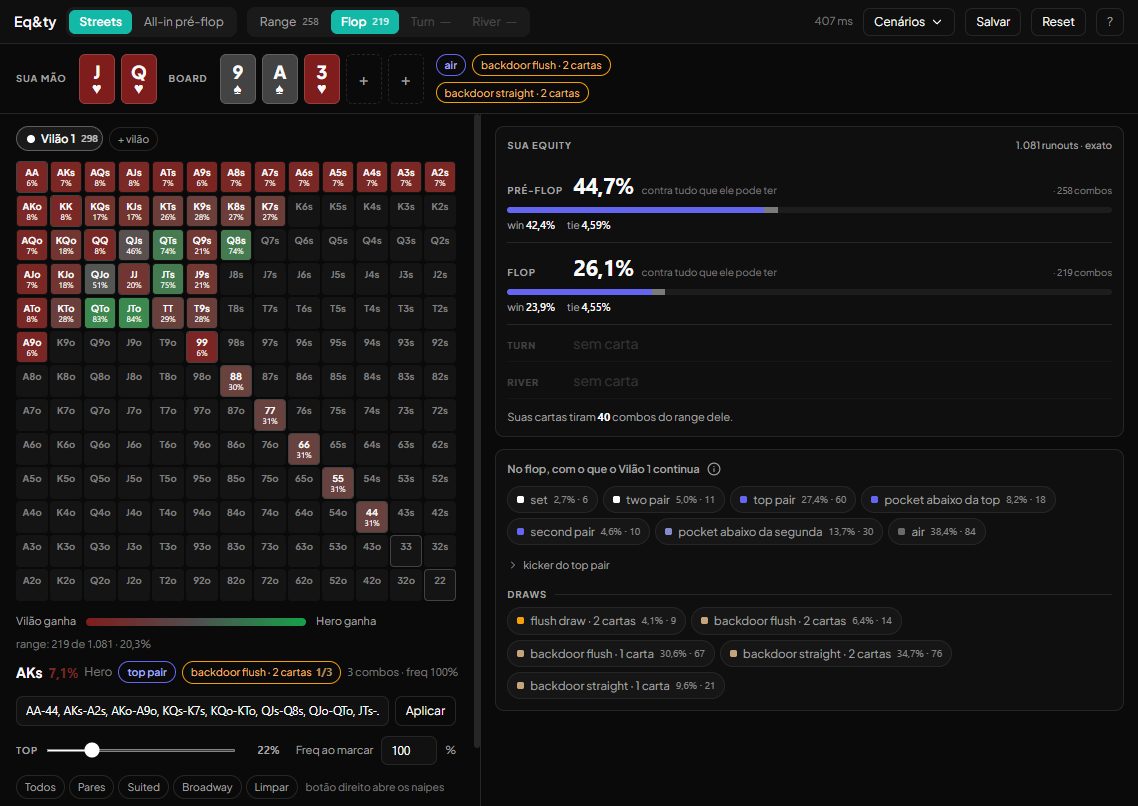
The base is not 1,326
Your cards and the board leave the deck before the math. That is why you see 1,225 preflop and 1,081 on the flop. A range that would be 21.1% in a regular tracker shows up here already discounted for your cards, and the panel says how many combos they removed from it.
It is not a bug. It is the right math: he cannot hold what you hold.
The two numbers
When the filter cuts something, two appear:
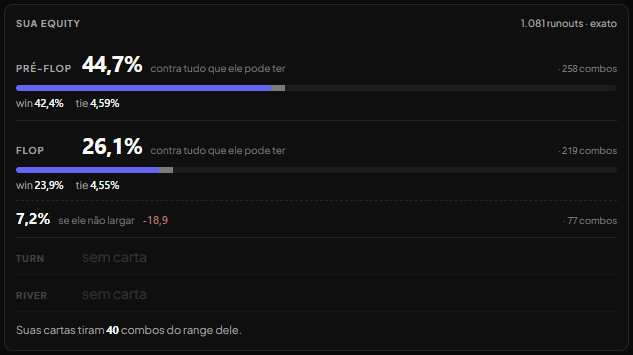
26.1%   against his whole range
  7.2%   if he doesn't fold          −18.9   ·   77 combos
The lower one is what counts when he bets, and when you bet and he calls. The upper one is there to show the size of the cut.
A big delta means a polarized range on that board: what he continues with is much better than his average.
The filter is a cascade
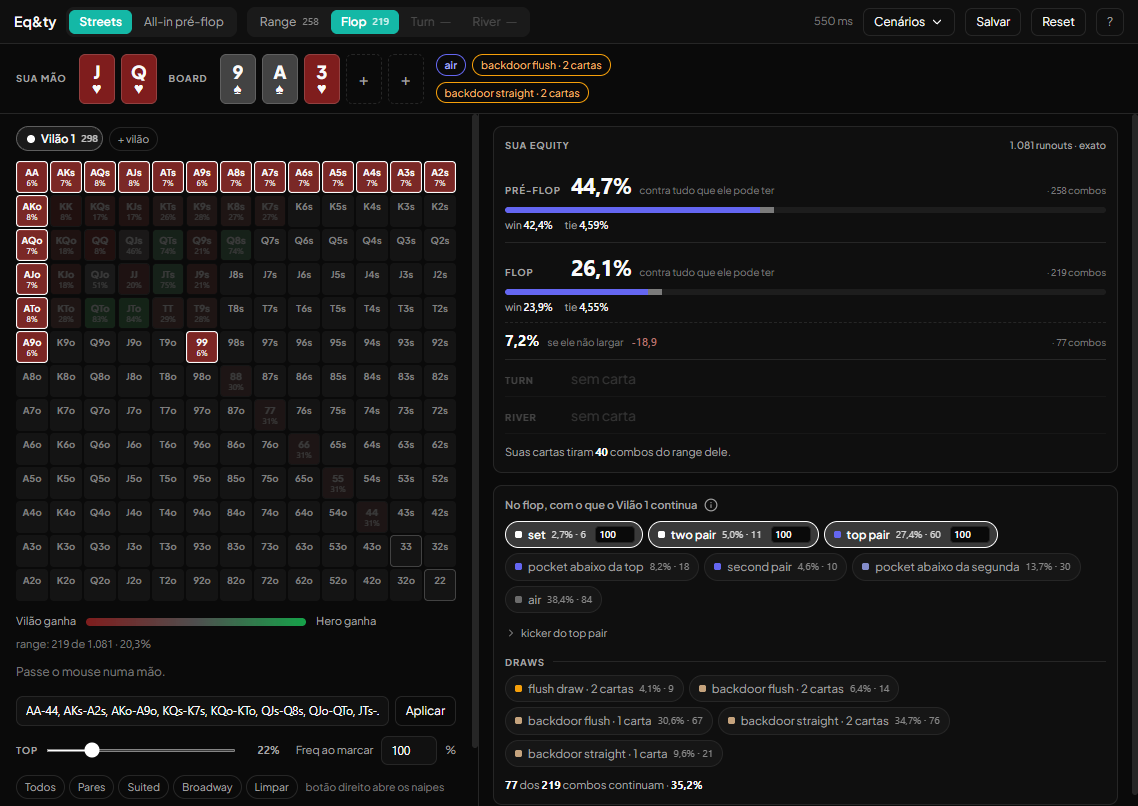
Each street has its own, and the turn starts from what is left of the flop. What he folds on the flop does not reach the turn. If you change the turn filter thinking you are changing the whole range, you are reading a different number.
Each checked category takes a Freq: 50 means he continues with that category half of the time. Right click on a hand opens the suits, to remove or add a specific combo when the category catches too much or too little.
Exact and estimated
The panel says which of the two you are reading, and it changes with the street you pick.
1,081 runouts · exact    heads-up with a board: every runout counted
120,000 hands            preflop, multiway and all-in: sampling
Heads-up with a board the number is exact, with no margin. Preflop, multiway and preflop all-in are sampled: multiway shows the margin on the panel, and in the all-in it is about 0.3 points. Recalculate draws again and the value moves by half a point.
Do not decide anything over 0.2 or 0.3 points between two estimated numbers.
The grid
The color of each hand is your equity against it on that board. Hover over a hand and the footer shows the number and what the hand is there.
With more than one villain the grid stops coloring, because there is no equity against a single hand. And tie becomes split: in multiway, a tie is not half the pot.
What it does not do
No ICM, no stack, no side pot, no position, no rake. The number is in chips and counts only showdown, with no fold equity.
The filter is per street, not per action. What he calls with and what he bets with are different cuts, and only one fits at a time.
Dead cards are only your hand and the board. You cannot remove a card from someone who folded.
Shortcuts
H          your hand
B          board
1 2 3      flop, turn, river
Ctrl+Z     undo in the range
Del        clears the active villain's range
Reference
Full manual
Detailed step by step, all modes and limits. Open it if you need the detail.
Eq&ty calculates how much your hand wins against what the villain can hold, street by street. It shows up in the Loot menu for players and coaches. The manual follows the order of an analysis; the hands, ranges and scenarios are examples. The ? right below Reset, in the top corner of the screen, opens this manual in a new tab without touching what is on screen.
1. What Eq&ty answers, and what it does not
It answers
- Streets. How much your hand wins against the villain's range before the flop, on the flop, on the turn and on the river. And how much it wins against the part of the range that stays in the hand, after you say what he continues with.
- Preflop all-in. In an all-in before the flop, with 2 to 6 players, each range's share of the pot.
It does not answer
- Whether you should call, bet or fold. Eq&ty gives the equity. The decision comes from comparing it with the price, and you are the one who makes that comparison (section 3).
- How much to bet.
- What a line earns once you count the villain's folds. Equity is your share of the pot if the cards run out with no more betting.
- The value of the hand in a tournament. The number is in chips: ICM is not included.
- How the villain really plays. The range is your guess, and Eq&ty calculates on top of it.
2. Your first analysis, in 4 steps
The screen opens in Streets mode, empty. Nothing is calculated until you enter your hand and the range of at least one villain. With both, the preflop equity appears; with the flop, the streets appear.
Step 1: your cards
Click one of the two slots in Your hand, or press H. Pick the two cards and click Use.
Step 2: the villain's range
With the top bar on Range, build his range on the grid. Click a hand to mark it; drag to mark several. If you already have the range written out, paste it in the field that says Paste the range and click Apply.
The range used in this manual is AA-44, AKs-A2s, KQs-K7s, QJs-Q8s, JTs-J9s, T9s, AKo-A9o, KQo-KTo, QJo-QTo, JTo.
Under the grid, the range line says how many combos he has and what share that is of all possible hands: in the example, 258 of 1,225 · 21.1%. Hands that use your cards are already out of the count, and the right panel tells you how many: Your cards remove 40 combos from his range.
With your hand and the range, the Your equity panel already shows the PREFLOP line: 44.7% against his whole range, your equity before the flop. The top of the panel says 120,000 hands because preflop is estimated (section 5), and the number is the same as in Preflop all-in for the same hand and the same range. The Range step on the top bar shows the same 258 combos: Range 258.
Step 3: the flop
Click a slot in Board, or press B, and pick the three flop cards at once. Since the range is already built, the bar moves to Flop on its own when you click Use.
Step 4: the number
The number appears on its own. There is no calculate button: while it calculates, the top of the screen shows calculating…, then the time it took. In the Your equity panel:
- 26.1% against his whole range is your equity against his entire range on the flop.
- 219 combos is the size of that range on the flop, already without the hands that use your cards or the board's.
- win is the share where you win outright; tie is the share where you tie.
- 1,081 runouts · exact says the number is exact: every turn and river combination went into the math.
- PREFLOP stays above FLOP, with the number from before the flop.
The grid gets color. Each hand shows your equity against it, from red (Villain wins) to green (Hero wins). Hover over a hand to see, under the grid, your equity against it and what it is on that board.
3. Reading the number: equity versus pot odds
Equity is your share of the pot at showdown. To decide a call, compare the equity with the price of the call.
The price (pot odds) is what you pay divided by the pot after your call:
- The pot is 10 BB and the villain bets 5 BB.
- You pay 5 BB to contest 10 + 5 + 5 = 20 BB.
- The price is 5 ÷ 20 = 25%.
The yardstick: if your equity against the hands he bets with is above the price, the call wins chips in the long run, counting only showdown. If it is below, it loses.
Which of the two lines to use. When you mark what he continues with (section 4), the panel shows two numbers on the same street:
- 26.1% against his whole range: against the entire range.
- 7.2% if he doesn't fold: against only the hands that continue. The −18.9 beside it is the difference, in points, from the number above, and 77 combos is the size of what continues.
In the example, against the whole range you have 26.1%, above the 25% price. If he only bets with set, two pair or top pair, you have 7.2%, far below. When he bets, the number that counts is the lower one, because those are the hands you are playing against. The same goes when you are the one betting: the lower number is what you have when he calls.
The second line only appears when the filter removes some hand. An equity above the price does not guarantee profit: read section 7 before deciding over a one-point difference.
4. The villain's range
Build the range
- Grid: a click marks one hand; dragging marks several. Starting a drag on a hand that is already marked unmarks it.
- Notation: paste it in the field and click Apply. It accepts
77+,A2s+,KQo, ranges likeAKs-A2s, exact combos likeAcQcand frequency likeAKs:50. If any piece cannot be read, the screen says which and applies nothing. - Top: the bar marks the strongest preflop hands, up to the percentage you choose.
- Fill shortcuts: All, Pairs, Suited, Broadway and Clear.
- Freq: how often the villain has the hand. Freq 50% means he has that hand half of the time. The number in Freq when marking, beside the Top bar, applies to the hands you mark from then on. A cell with Freq below 100 gets an amber dot.
- One combo only: right click a hand to open the suits. Each button is a combo. The Freq field in that window changes at once the frequency of the lit combos of that hand.
- Undo: Ctrl+Z. Del clears the active villain's range.
- More than one villain: + villain adds another, up to 3. Each villain has his own range and his own filters.
The continuation filter, street by street
Pick Flop on the top bar. The On the flop, if Villain 1 doesn't fold panel shows what his range has on that board: made hands and, below, draws. Each category shows its share of the range and the number of combos.
- Click a category to mark that he continues with it. The hands that continue light up on the grid and the others dim.
- With the category marked, the field beside it says how much of it he continues with: 100 is always; 50 is half of the time.
- Below it shows how much of the range continues. With set, two pair and top pair marked: 77 of 219 combos continue · 35.2%.
- top pair kicker splits top pair by kicker.
- With nothing marked, he continues with the whole range.
The turn starts from what continued on the flop: a hand he folds on the flop does not reach the turn. Pick Turn and mark what he continues with there; then the River. Each street has its own filter, and the panel shows your equity on all three.
How the categories are counted:
- Each combo has exactly one made hand, and the made hands add up to 100% of the range.
- Draws add on top: the same combo can have a flush draw and a gutshot.
- A pair that is only on the board is nobody's pair. A♥Q♥ on K♠7♦7♣ counts as ace high.
- A draw needs at least one card from the hand, and on the river there are no draws.
Adjust combo by combo
When a category catches too many hands, or too few, adjust by hand. With the bar on a street:
- Click a hand to switch between continues and does not continue.
- Right click opens the suits: lit continues, dark does not continue. A combo that uses a board card goes dark and cannot be picked.
- There is no Freq on a street: each combo continues whole or does not continue.
- The adjusted cell gets a mark: crossed out when you removed a combo, ringed when you added one. The panel counts combos set by hand, and clear undoes that street's adjustments.
The adjustment applies only to that street and only to that villain, and it stays in force if you check or uncheck categories later. With the bar on Range, a click on the grid goes back to editing the base range, not the filter.
5. Multiway preflop all-in
When to use it
When the money goes in before the flop: short stack shoves and calls, with 2 to 6 players. There is no board and no filter here. It is range against range.
How to use it
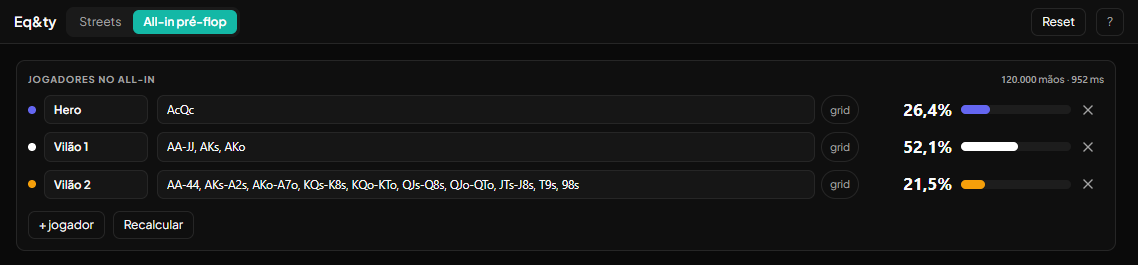
Click Preflop all-in, at the top of the screen; to go back, click Streets. On each row, type the range and press Enter. The first row is the Hero, and it accepts an exact hand, like AcQc, or a range. + player adds players, up to 6. Each player's number appears on its own, and the table's shares add up to 100%.
To mark a range on the grid, click grid on the player's row. The window has the same grid, the Top bar, Freq when marking and the fill shortcuts from section 4.
Why there is a margin
With no board, counting every five-card combination for each pair of hands would take too long. Eq&ty draws hands at random: 120,000 with up to 3 players and 80,000 with 4 to 6. The panel shows how many hands went into the math.
That is why the number has a margin, even if it does not show on screen. In our measurements, each share lands within about 0.3 points of the exact value, in 95 of every 100 calculations. The same table always gives the same number on the first calculation. Recalculate draws again, and the number can move about 0.5 points between one calculation and another: AcQc against the wide example range stayed between 60.9% and 61.3% on the first calculation and the next 9 Recalculates.
The PREFLOP line in Streets does the same math: for the same hand and the same ranges, both modes give the same number on the first calculation. Streets has no Recalculate; after a Recalculate in the all-in, the two can end up about 0.5 points apart.
In practice: do not decide over a 0.2 or 0.3 point difference between two all-in numbers.
6. Save, reopen and Reset
Save
Click Save, give it a name and confirm. Eq&ty stores your hand, the board, the villains' ranges, the filters and the manual adjustments. The Preflop all-in mode is not saved.
- Your scenarios are yours only. Neither your coach nor the team management can see them.
- With a scenario open, the button says Save as new. Saving always creates another scenario and never changes the one you opened.
- If the scenario gets too big to save, almost always from too many manual adjustments, the panel warns you first and says what to clear to make it fit.
Reopen
Click Scenarios and pick one from the list. The scenario opens as it was saved: what you changed afterward and did not save is left behind. The X beside the name deletes the scenario, after you confirm.
Reset
Reset clears the mode you are in and leaves the screen as it opens. First it asks for confirmation and says what is lost. In Streets, you lose the hand, the board, the villains and their ranges, the filters and the adjustments. In Preflop all-in, you lose the Hero's hand, the ranges and the extra players. The other mode does not change.
To change only the board and keep the rest, press B and pick another flop, or click Clear the board in the same picker.
Shortcuts
| H | pick your hand |
| B | pick the board |
| 1, 2, 3 | go to Flop, Turn and River |
| Ctrl+Z | undo the last change in the range |
| Del | clear the active villain's range |
7. The limits: what the number does not say
Read this section before drawing a conclusion from a number.
- Equity is not profit. Equity is your share of the pot if the cards run to the river with no more betting. At the table there is still betting on the turn and the river. An equity above the price can lose chips, and one below can win.
- The number is only as good as the range. With the wrong range, the number is right and the conclusion is wrong. Eq&ty does not know how he plays.
- The filter is per street, not per action. "What he calls with" and "what he bets with" are different cuts on the same street, and each street has only one filter.
- Categories follow fixed rules. Two hands in the same category can have very different equities. Check the hand on the grid when the difference matters.
- Freq is frequency. Freq 50% says how often the villain has the hand. It does not measure how important the hand is.
- With 2 or 3 villains, the number is estimated. The panel shows how many hands were drawn and the margin, swaps tie for split and shows your equity against each villain alone. The grid stops showing equity hand by hand. The maximum is 3 villains.
- Preflop is also estimated, in the all-in and on the PREFLOP line of Streets, with a margin of about 0.3 points (section 5).
- Only your cards and the board leave the deck. In Streets, you cannot remove the cards of someone who folded.
- Nothing about the tournament or the table goes into the math. ICM, stack size, side pot, position and rake are not included.
- If a number looks wrong, check the range and the filters. If it still looks odd, tell us with the Loot Feedback button.